Every meeting,
on the record.
Kiroku records Zoom, Teams, Meet — any call — without a bot joining. It transcribes on your Mac and writes client-ready minutes in your company's own format. The audio never leaves your computer.
curl -fsSL https://masterbek.uz/kiroku/install.sh | bashLeesWe shipped the login fix on the 7th.
田中様こちらでも確認しました。
BekiCan we move the demo to the 20th?
田中様大丈夫です。候補日は15日までに。
KarenWe'll reuse staging.
【議事録】ACME様 週次定例
| No. | 宿題 | 担当 | 期限 |
|---|---|---|---|
| 1 | リリース候補日のご提案 | 田中様 | 10/15 |
| 2 | デモ準備 | Karen | 10/20 |
No bot joins. Nobody waits in the lobby.
Kiroku starts when any app uses your microphone — Teams, Zoom, Google Meet in a browser, Slack, Webex, LINE — and records your voice and the call as two clean tracks. Clients never see a “Notetaker has joined”.
Client-ready 議事録, minutes after the call.
Give Kiroku one set of minutes you sent before — Word, PDF or text. It keeps the headings, tables, numbering and politeness, and fills them only with this meeting.
【議事録】ACME様 週次定例
| No. | 内容 | 担当 | 期限 |
|---|---|---|---|
| 1 | 見積書の送付 | Beki | 9/30 |
【議事録】ACME様 週次定例
| No. | 内容 | 担当 | 期限 |
|---|---|---|---|
| 1 | リリース候補日のご提案 | 田中様 | 10/15 |
| 2 | デモ準備 | Karen | 10/20 |
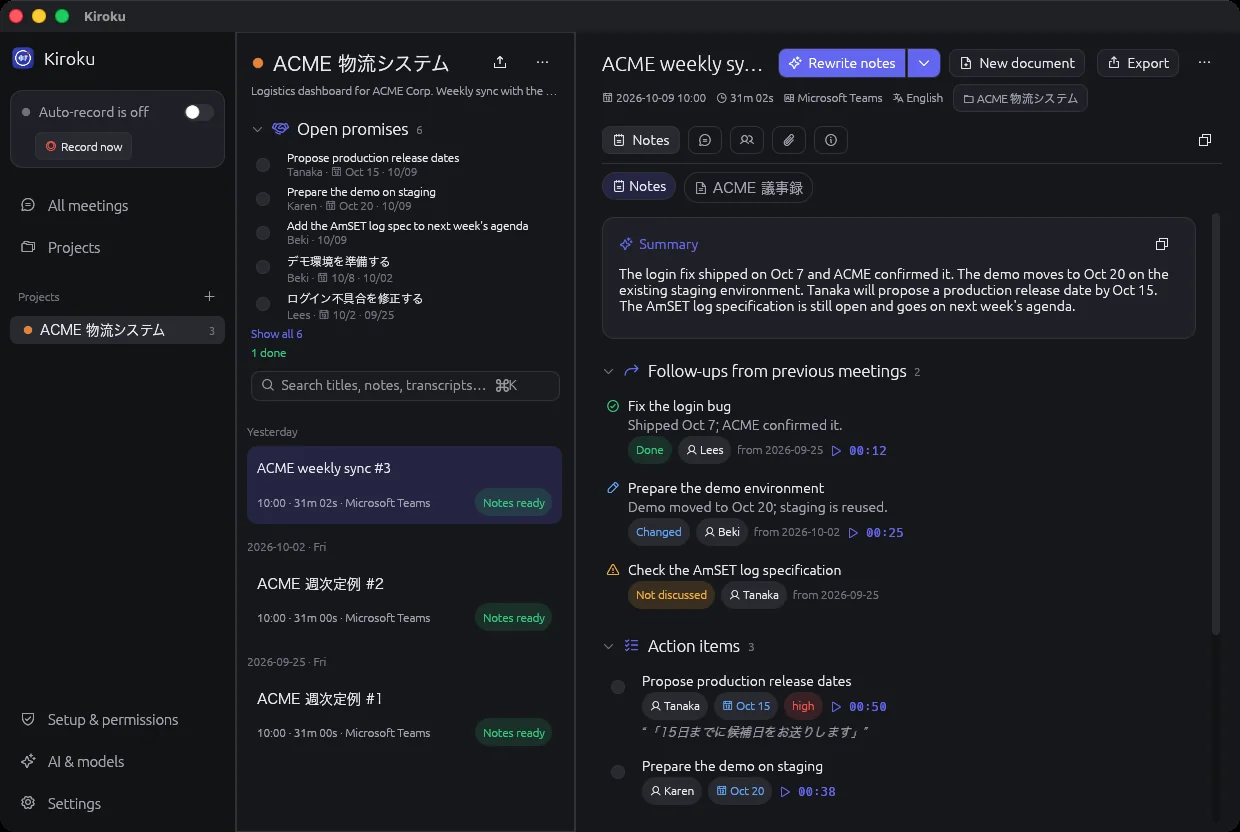
It remembers what was promised.
Every new set of notes reports what became of earlier action items. A promise closes when a later meeting reports it done; the ones nobody mentioned are flagged before the client asks.
SEP 25
Open
Open
OCT 2
In progress
Open
OCT 9
✓ Done
Not discussed
Even around one speakerphone.
Your mic and the call are separate tracks. When colleagues share your microphone in a meeting room, Kiroku tells their voices apart, recognizes you, and remembers voices from earlier meetings.
In the room
BME KL1 SL2Remote
TR1 LR2BekiLet's start with the budget.
田中様はい、お願いします。
KarenDesign needs three more weeks.
SatoWe can start the mobile screens first.
The audio never leaves your Mac.
Speech becomes text on your computer. Only text goes to the AI you already use — Claude, ChatGPT, Copilot or Gemini — or to a local model, so nothing leaves at all. No account, no Kiroku server, no tracking.
Your Mac
Japanese, English, Uzbek and Russian in one call.
Each phrase stays in the language it was spoken. The notes come out in the language your reader needs: 議事録 in Japanese for the client, a summary in Uzbek for the team.
田中様仕様の確認は来週でも大丈夫ですか?ja
BekiYes, next week's agenda.en
JasurStagingni bugun tayyorlab qo‘yaman.uz
AnnaЛоги AmSET проверю завтра.ru
A misheard name, corrected everywhere.
Find & replace runs through the transcript, the notes and every document at once, and remembers the spelling for next time. Click a line to hear it; double-click to correct it.
One calm window for every meeting.
Notes, transcript, speakers, documents and the promises of the whole project, searchable in a second.
And the details people notice on day two
Search every meeting
Titles, notes, documents and transcripts. Results open at the exact moment.
Export anywhere
Word, PDF, Markdown, text, SRT and VTT subtitles.
In-person meetings
One click records a client visit with no call at all.
An AI that keeps working
If one AI is logged out, Kiroku moves on to the next.
Several at once
Back-to-back calls are processed in parallel.
Japanese input
Typing with an input method works exactly as you expect.
Pay for the app, not the minutes.
Kiroku runs on your Mac with your own AI, so there are no minute limits and no per-hour fees.
Free
Forever, one Mac
- Automatic recording, no bot
- On-device transcription
- Summary and action items with your AI
Pro
For people who send minutes
- 議事録 and documents in your format
- Project memory and open promises
- Meeting-room speakers, voice memory
- Word and PDF export, find & replace
Founder
Pro for life on 2 Macs
- Every Pro feature, no subscription
- All 1.x updates
- A direct line to the developer
Team
Pro for the whole team
- Shared 議事録 formats
- One invoice, bank transfer
- Priority support
Enterprise — 50+ people, on-premises or a security review? One license per company, invoiced in your currency.
masterbek.uzPrices in US dollars, including VAT where it applies.
Questions people ask first
Which meeting apps does it work with?
All of them. Kiroku starts when any app uses your microphone — Zoom, Microsoft Teams, Google Meet in any browser, Slack, Webex, LINE, FaceTime — and records in-person meetings with one click.
Do I need an AI subscription?
Transcription runs on your Mac and needs nothing. For notes and 議事録, Kiroku uses the AI you already have — Claude, ChatGPT, GitHub Copilot or Gemini — an API key, or a free local model with Ollama.
Where is my data?
In a folder on your Mac. Audio is never uploaded. Only transcript text goes to the AI you chose, and with a local model not even that. There is no Kiroku account or server.
Which Macs are supported?
Macs with Apple silicon (M1 or newer) on macOS 14.4 or later. A Windows version is in testing.
How do I install or update it?
Paste the one-line command into Terminal. It downloads Kiroku, puts it in Applications and opens it. Run the same line again to update.
What about recording consent?
You decide when Kiroku records and can pause it with one switch. Tell the other participants you are taking notes, as the law and your clients expect.
Stop writing minutes. Start sending them.
Kiroku is free to start on any Apple silicon Mac.
curl -fsSL https://masterbek.uz/kiroku/install.sh | bash